
Mosaico 0.8 and 0.9: LeRobot Import and Export, Aggregated Queries, and Hooks
Mosaico 0.8 imports LeRobot datasets, adds aggregators to the query engine, and introduces hooks. 0.9, out today, exports sequences back to LeRobot, ingests PX4 flight logs, and runs the SDK examples from the CLI.

Mosaico 0.8 came out on November 23 and 0.9 is out today! Together they move LeRobot datasets in both directions, add aggregators to the query engine, introduce hooks, and ingest PX4 flight logs. 0.8 has breaking changes, covered in Upgrading. The full changelogs are in the release notes of 0.8.0 and 0.9.0.
LeRobot Integration
Since 0.8, mosaico inject lerobot imports a LeRobot v3.0 dataset and creates one sequence per episode. Since 0.9, mosaico extract lerobot writes sequences back to a LeRobot dataset, one episode per sequence, in the order given.
As an example, take PushT, a simulated task from the Diffusion Policy paper: an agent pushes a T-shaped block until it covers a target. Its LeRobot dataset, lerobot/pusht_image, has 206 human demonstrations recorded at 10 fps, with a 96×96 top-down image, the agent position and the action at every frame. Imported with --name pusht, it becomes the sequences pusht_episode_000000 to pusht_episode_000205. On a local mosaicod, the import takes about ten seconds.
mosaico inject lerobot --name pusht ./datasets/pusht
mosaico extract lerobot --saving-path ./exports --name pusht_subset \
  pusht_episode_000000 pusht_episode_000001
Each sequence keeps the statistics of its episode as metadata you can query, so you can select the episodes you want and export them as a new dataset to train on. The exported dataset gets new episode indexes, tasks and statistics, computed the way LeRobot computes them. Episodes from different datasets can be exported together, as long as they record the same features at the same frame rate with the same robot.
Video features are skipped in both directions for now, which is why the example uses the version of the dataset that stores frames as images.
The ROS and MCAP bridges are in the same CLI. Every command takes the server address from the active profile.
mosaico inject ros     --name drive_0423 ./bags/drive_0423.mcap
mosaico inject mcap    --name arm_run_17 ./recordings/arm_run_17.mcap
mosaico inject lerobot --name pusht ./datasets/pushtmosaico extract ros drive_0423
mosaico extract mcap arm_run_17
mosaico extract lerobot --name pusht_subset pusht_episode_000000 pusht_episode_000001The options are in the CLI reference.
Aggregators
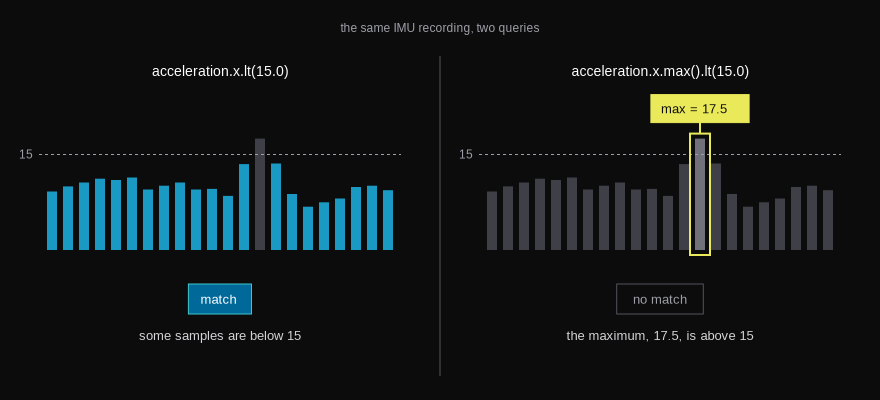
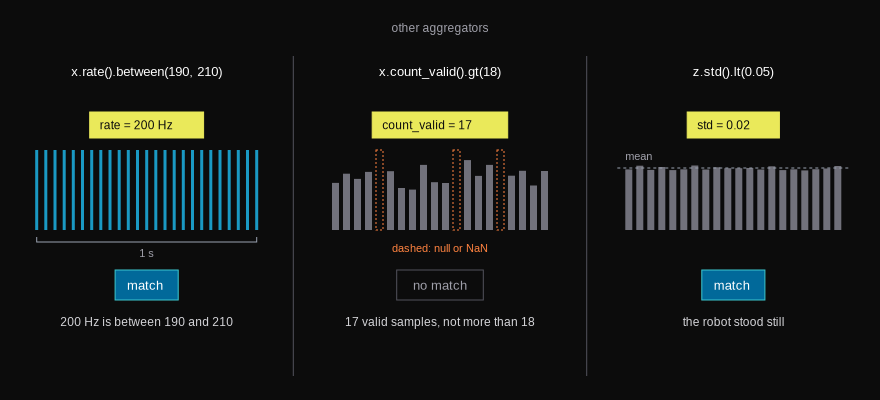
Before 0.8, a query matched a topic when at least one sample satisfied the condition. Aggregators compute one value per topic, such as the maximum, the mean or the sampling rate, and test the condition on that value. The computation runs on the server.
QueryOntologyCatalog(
    IMU.Q.acceleration.x.rate().between(190, 210),   # Sampled at about 200 Hz
    IMU.Q.acceleration.x.max().lt(15.0),             # Never above 15 m/s²
    IMU.Q.acceleration.x.count_valid().gt(59_400),   # At most 1% invalid samples
)
The aggregators guide lists them all.
Hooks
A hook is a URL that mosaicod calls when an upload finishes. Register one with mosaicod hook create <url> and receive the events in Python with HookServer:
@hook
def on_event(e: Event):
    if isinstance(e, SessionUploaded):
        print(f"{len(e.topics)} topics uploaded to {e.sequence_name}")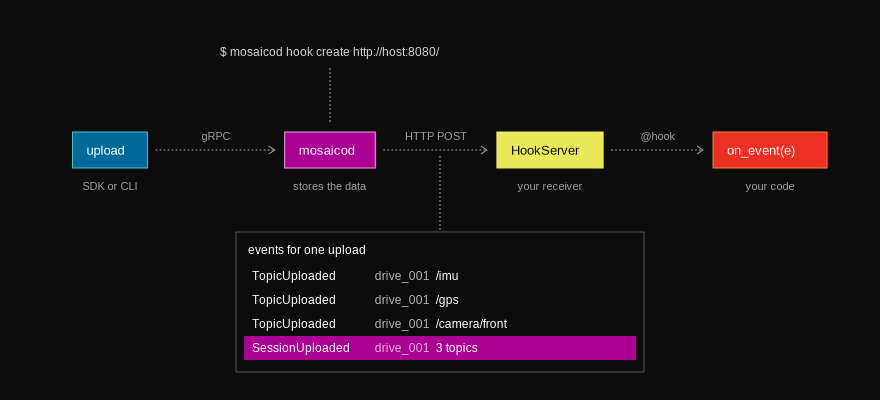
Any HTTP server can receive the events. The hooks guide has two full examples.
PX4 Flight Logs
0.9 adds a bridge for ULog, the log format of the PX4 autopilot, to the Python SDK. A .ulg file becomes one sequence, and each message format and instance becomes one topic, such as /sensor_accel/0.
mosaicolabs.ulog_injector ./flight.ulg --name flight_01ULog timestamps count from the boot of the vehicle, so each sequence starts near zero. When the log has GPS time, the offset to UTC is stored in the sequence metadata.
SDK Examples from the CLI
mosaico examples runs the official SDK examples against the server of the active profile: ingesting a sample recording, querying the catalog, reading data back.
mosaico examples ls
mosaico examples ros_injection
It replaces the mosaicolabs.examples script, which is deprecated.
Other Changes
TopicWriter.push_batch()writes an Arrow record batch in one call.- S3 credentials are optional, so
mosaicodcan use IAM instance roles. mosaicodchecks numeric and object store settings at startup.- A topic still being uploaded returns an empty time window instead of an error when its flight info is requested over a time range.
mosaico inject lerobotexits with code 1 when an episode fails.
Upgrading
The wire protocol of 0.8 uses Protobuf, so mosaicod and the Python SDK must be upgraded together. list_flights is now paginated.
Aggregators need statistics that 0.7 didn’t store, so run the store optimizer once after upgrading from 0.7. A topic doesn’t show up in ontology queries until the optimizer has rewritten it.
mosaicod store-optimizerThe migration guide has the details. Going from 0.8 to 0.9 needs no migration.
A New Release Cycle
0.8 came six weeks after 0.7 because we changed the release cycle and rebuilt the release pipeline. Now mosaicod, the SDK and the docs ship together every week, under one version, from one signed tag on main. Any weekly release can include breaking changes. The details are in the release cycle documentation.
What’s Next
Our hackathon, Physical Education Vol. 1, runs in Milan from November 27 to 29, on 0.9: import episodes, select the ones you need, and export them to train on.
Questions and bug reports go to GitHub Discussions, or bring them to the hackathon.
Ready to tame
your data chaos?
Join disruptive companies and robotics leaders.
Start building with Mosaico in minutes.
Open source · Deploy in < 5 min